🏡 A family notebook for everyone

Your shared family planner,
one care plan.

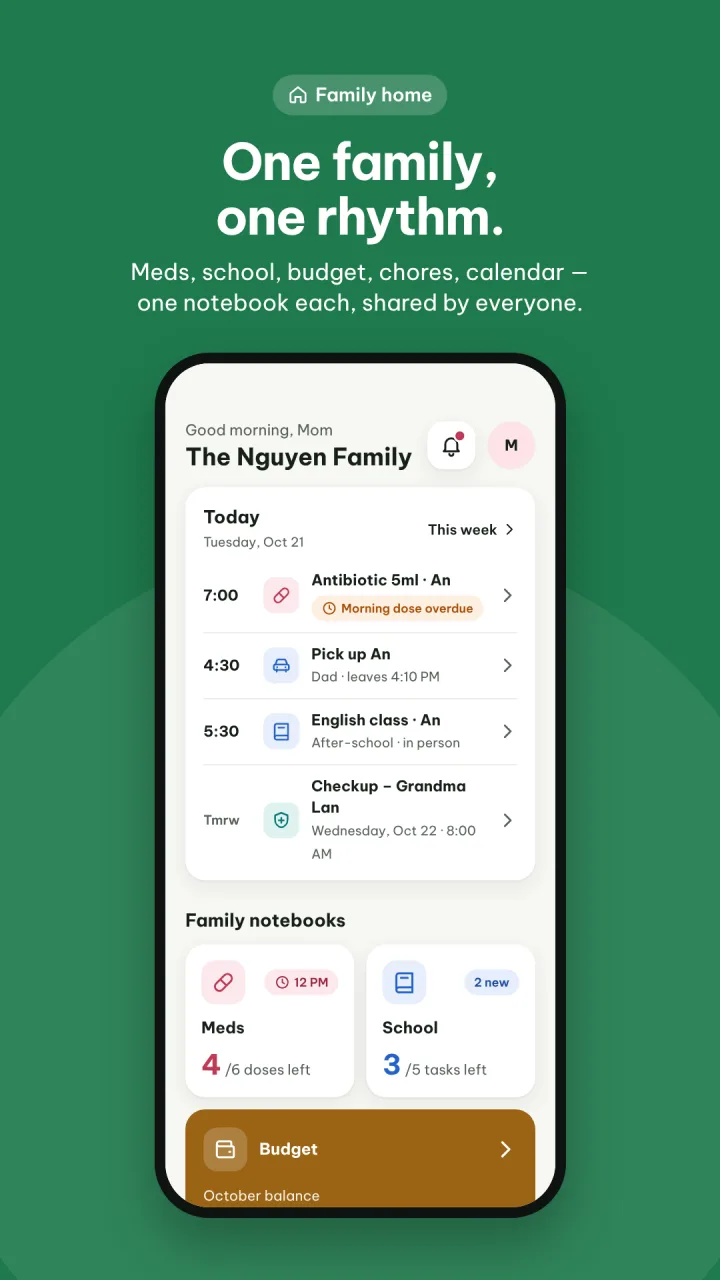
FamilyNest Pro brings medication schedules, school activities, household expenses, chores and a shared calendar into five family notebooks. One notebook per task, one rhythm for the family.

For parents, grandparents and kidsLarge text for older adultsDark mode included
Every family knows this
💊 Grandma's medicine📚 The kids' timetable🛒 This month's groceries🍽️ Whose turn for the dishes?

When everything lives in a different place, things get forgotten and out of sync. FamilyNest Pro puts it all into 5 shared notebooks — everyone can see them, everyone can update them.

Features

One notebook per task

Five notebooks for the things your family repeats every day.

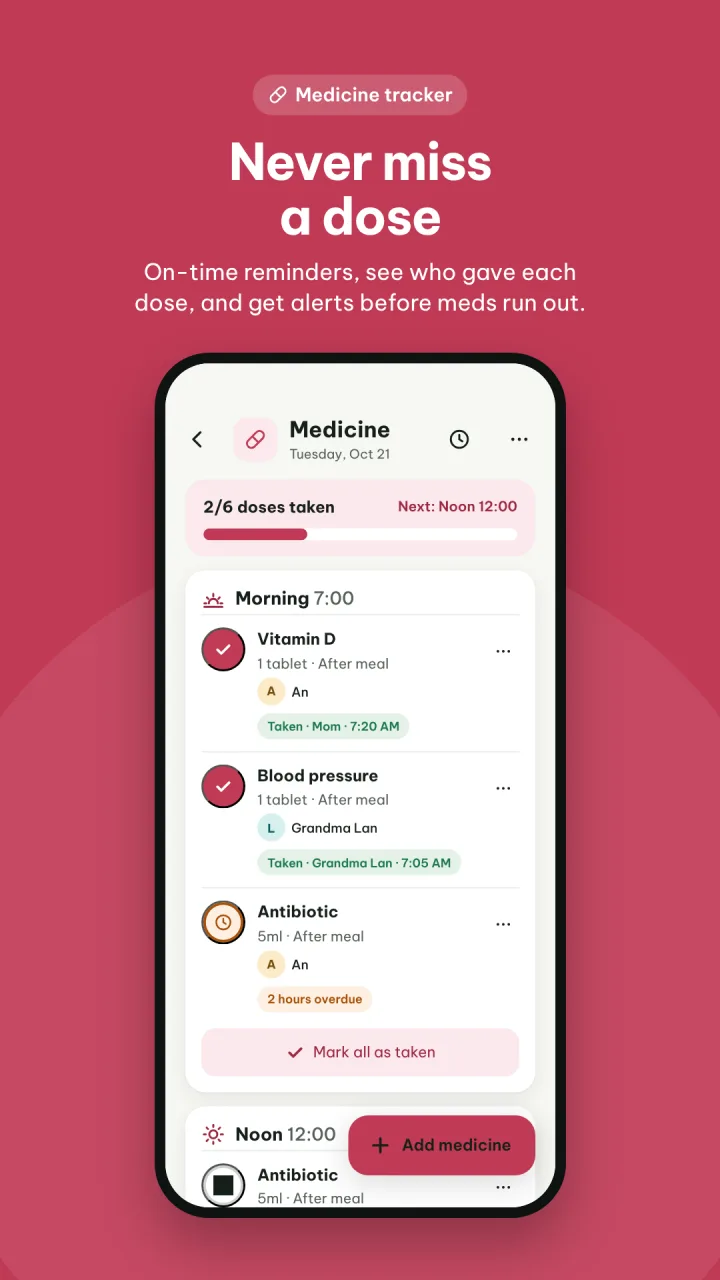
Medicine notebook

  • Dose reminders for morning, noon and evening
  • See who gave each dose and when
  • Alerts for overdue doses and medicine running low
  • Keep prescriptions per person and per illness

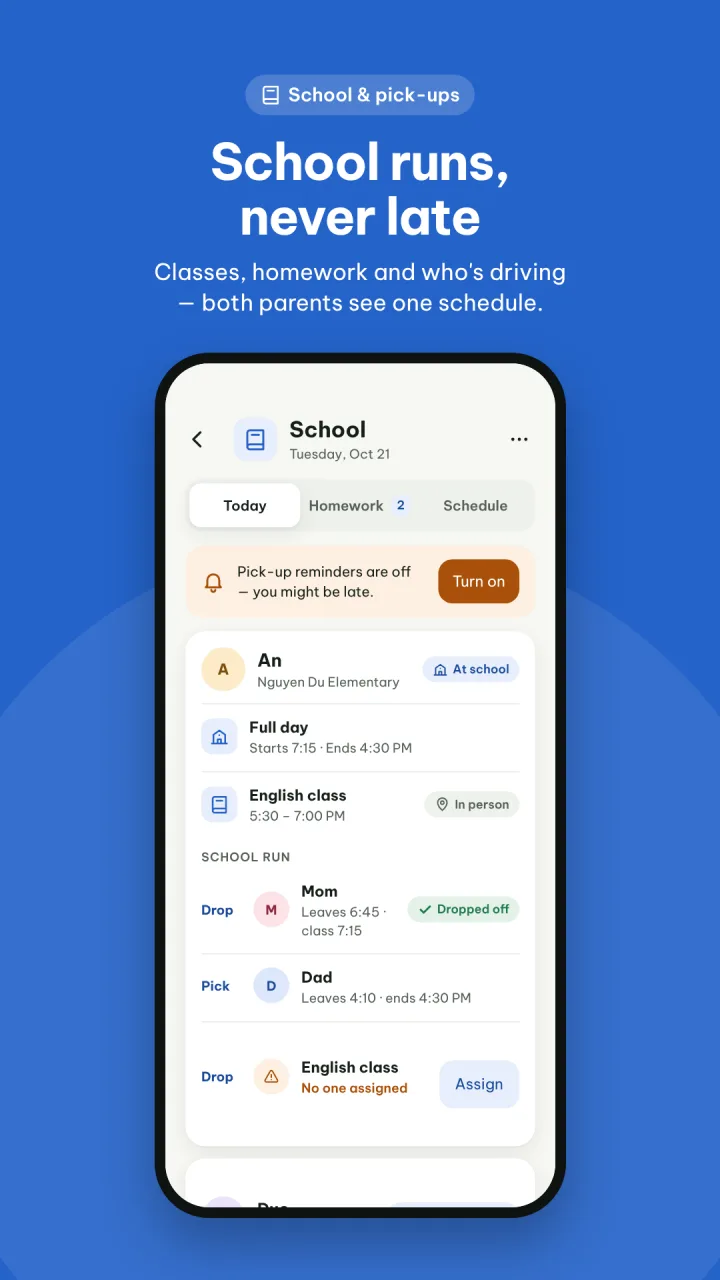
School notebook

  • School and extra-class timetables for each child
  • Assign drop-offs and pick-ups, with departure reminders
  • Track homework and due dates

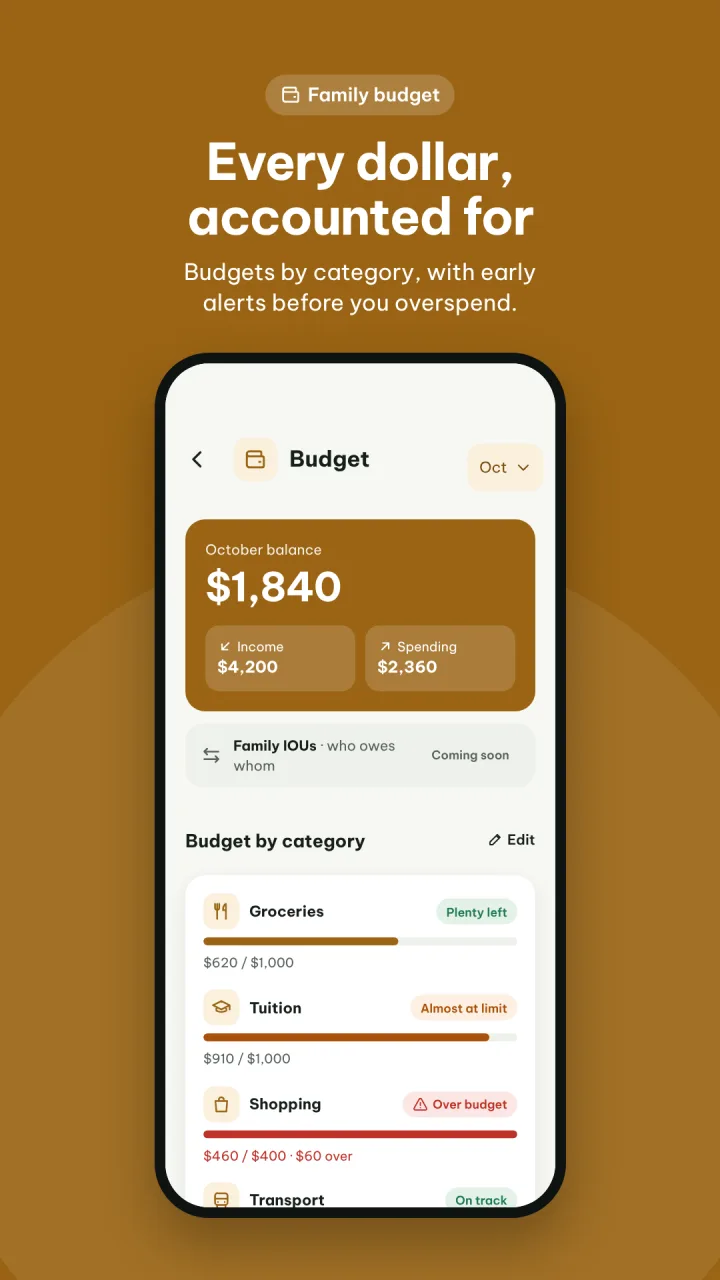
Spending notebook

  • Monthly income, spending and balance
  • Budgets by category: food, tuition, shopping, transport…
  • Early warnings before you go over budget

Chores notebook

  • Assign tasks to each member
  • See the whole family's progress

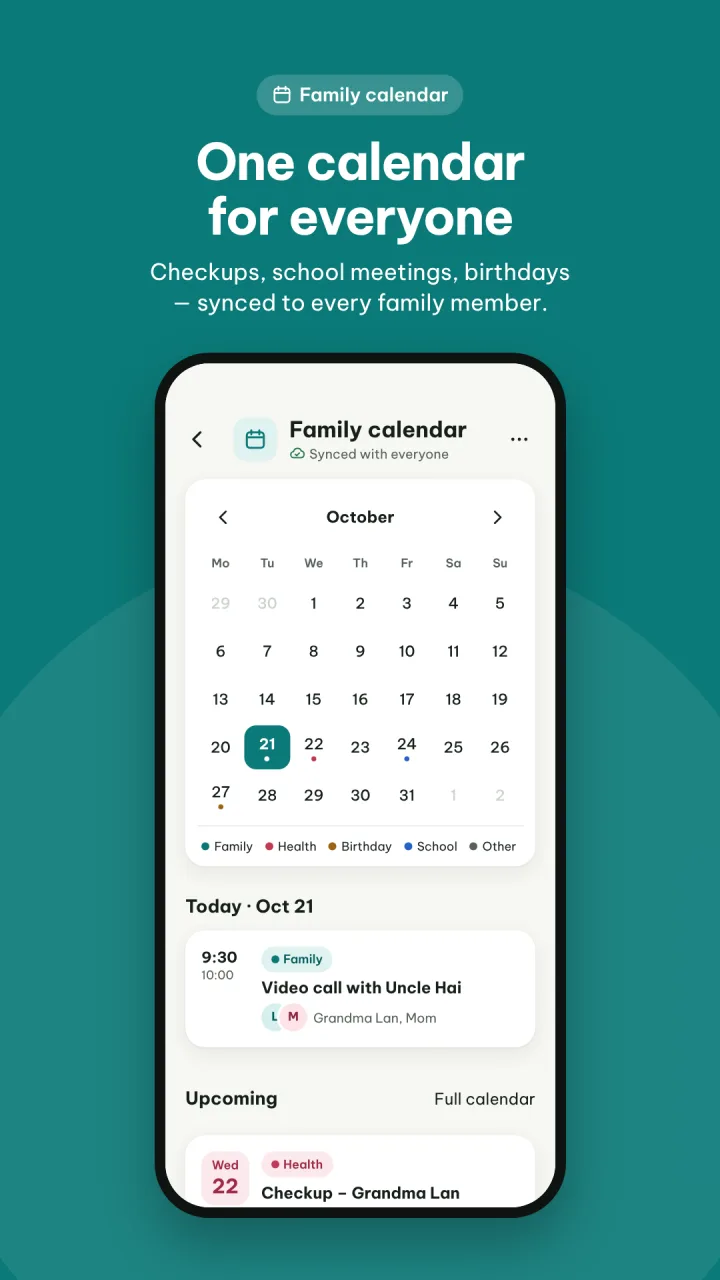
Calendar notebook

  • One shared calendar: doctor visits, parent meetings, birthdays…
  • Colour-coded and synced to every member
Nestmi AI

Ask once, and the whole family knows.

Nestmi is the AI assistant built into FamilyNest Pro. It reads your family's 5 notebooks within your permissions to answer questions, write things down for you and flag what is coming up.

  • Ask

    Quickly look up the family's schedule, medication, spending, chores and school.

    • What does Grandma take today?
    • What did we spend most on this month?
    • Who picks up the kids next week?
  • Ask it to do

    Say it in one sentence. Nestmi drafts it so you can preview and confirm.

    • Log 250k for groceries today
    • Assign Nam to wash the car on Saturday
    • Add a parent meeting at 8am tomorrow
  • Remind

    A morning brief and early warnings when medication runs low or spending nears the budget.

    • Grandpa's blood pressure pills run out in 3 days
    • Groceries have used 90% of this month's budget
  • Scan receipts

    Snap a receipt and Nestmi reads the amount, date and store so you can check it and save it to the expense notebook.

Product introduction

See FamilyNest Pro in action

Tap the video for a quick tour, then swipe through screens from each notebook in the app.
Home
Medicine notebook
School notebook
Budget notebook
Calendar notebook
Every member on board
For every member

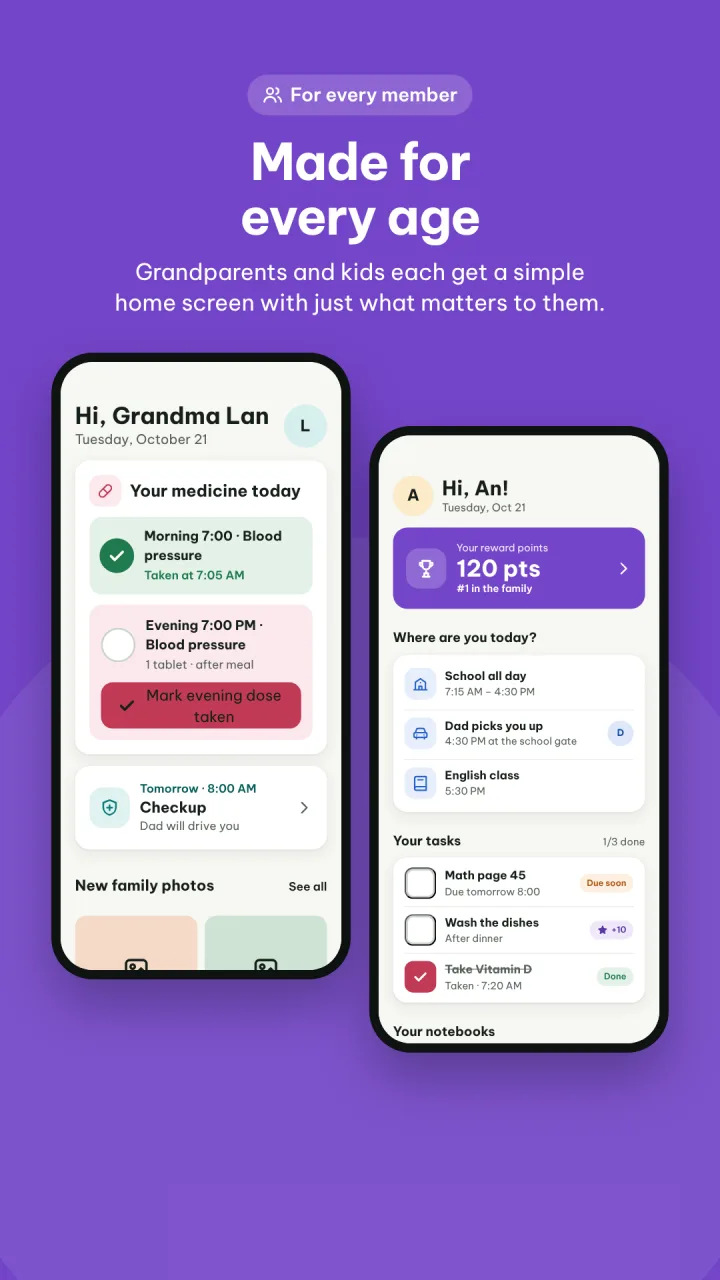
A home screen for each person

Whoever opens the app sees exactly what they need — nothing more, nothing confusing.

Parents

The full picture: medicines, schedules, spending, chores

Grandparents

Large, easy-to-read text and clear medicine reminders

Kids

Timetables, homework and assigned chores

Helpers

Only the tasks they need to do

Per-notebook permissionsChoose who can view and who can edit each notebook.
Large textEasy to read for older adults.
Dark modeEasy on the eyes at night.

FamilyNest Pro pricing

Compare Free, Plus, Pro and AI. The purchase prices and benefits are shown in the app.

Swipe horizontally to see all plans.

FamilyNest Pro pricing
FeatureFreePlusProAI
Monthly price$0$1.99$3.99$7.99
Annual price$0$19.99$39.99$79.99
Maximum members351020
Nestmi AI requests / month20100300600
Medicine notebookIncludedIncludedIncludedIncluded
School notebookIncludedIncludedIncludedIncluded
Spending notebookIncludedIncludedIncludedIncluded
Chores notebookIncludedIncludedIncludedIncluded
Calendar notebookIncludedIncludedIncludedIncluded
History & statisticsNot includedIncludedIncludedIncluded
CSV data exportNot includedNot includedIncludedIncluded
7-day free trialNot includedIncludedIncludedIncluded
Roadmap

FamilyNest Pro product roadmap

From today’s 5 shared notebooks to an AI Family Agent — an assistant that understands your family’s rhythm and takes work off your plate, while you stay in charge.

  1. Launch the 5 notebooks

    • Medicine, school, spending, chores and a shared calendar
    • View / edit permissions per notebook and a personal home screen for each member
    • iOS & Android apps with large text and dark mode
  2. AI Family Copilot

    • Ask in plain language: “What does Grandma take today?”, “How much did we spend this month?”
    • Create chores, appointments and expenses by voice or text — always with a preview to confirm
    • Type or use your phone’s keyboard dictation
  3. Proactive assistant

    • A morning briefing for the whole family: medicine, pickups, to-dos
    • Early warnings: medicine running low, budget almost exceeded, schedule clashes
    • Reschedule by voice; weekly summary
    • Snap a receipt to read the amount, date and store
  4. Connect & expand

    • Google Calendar / Apple Calendar sync
    • Home-screen widgets and a simplified mode for grandparents
    • Full English for Vietnamese families abroad
    • Moments - Keep family memories and compile a family journal
  5. AI Family Agent

    • Nestmi AI - Your Family's Intelligent Companion
    • Plans the family’s week from school schedules, medicine and chores
    • Coordinates and assigns tasks between members, reminding the right person at the right time
    • Carries out multi-step tasks within the limits you set
FAMILYNESTPRO VISION

From 5 notebooks to AI Family Agent

Nestmi AIAI supports your family from note-taking and lookups to proactively planning and getting things done — always under your control.

  1. FoundationNotes & sharingManage 5 family notebooks, with information synced according to each member’s permissions.
  2. CopilotAI Q&AAsk AI about schedules, chores, school, medication and spending from the data it is allowed to access.
  3. ProactiveProactive AI suggestionsSuggests reminders and warns about schedule conflicts and overspending.
  4. AgentAI in actionAI prepares a plan, shows you a preview and only acts after you confirm.

Principles that never change

  • You always decideAI suggests, you confirm before any data changes. Every action is logged and can be undone where supported.
  • Right accessAI can only read and act on data the member is allowed to use.
  • Health safetyAI helps manage medication schedules; it never diagnoses, changes doses or replaces a doctor’s instructions.
  • Privacy and transparencyOnly the data needed is processed, sharing with AI providers is transparent, and you control how AI is used.
Get started

Three steps to get the family in sync

Create your family

Download the app and create a shared space for your home.

Invite your loved ones

Add parents, grandparents, kids and helpers — each with their own role.

Open your first notebook

Usually grandparents' medicines. From there, the whole family follows and updates together.

FAQ

Frequently asked questions

Can grandparents use it?

Yes. FamilyNest Pro has a dedicated home screen for grandparents, large easy-to-read text and dark mode.

Who can view and edit the notebooks?

You set view / edit permissions per notebook. For example, everyone can see the calendar, but only parents can edit spending.

How do I know if Grandma took her medicine?

Every dose is marked with who gave it and when. Overdue doses and medicine running low trigger alerts.

Is the app available on iPhone and Android?

Yes. Download FamilyNest Pro from the App Store for iPhone or Google Play for Android using the links below.

Where can I get support?

Email us at family@5ts.io.vn.

One notebook per task — one rhythm for the family.

Download FamilyNest Pro and open your family's first notebook today.

Available on the App Store and Google Play. Some features require a paid plan.